STEMS is an open multi-track audio format, allowing the ability to freely interact with a track’s different musical elements. Each 'stem' can be controlled independently to create instant new mixes, mashups, instrumentals, acapellas, and more.
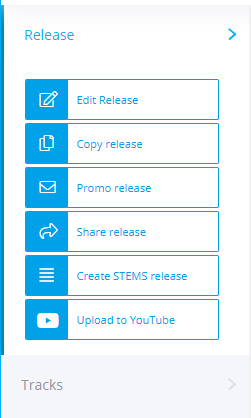
Each STEMS release must be linked to a standard audio release, therefore in order to create a new STEMS release in ampsuite you must first create a standard release as normal. Once this standard version of the release has been finalised and sent to stores, you can create a STEMS version by clicking in to Edit / View the release, and then click the Create STEMS release button which appears on the left hand side under the 'Release' tab (note this is only visible on final releases).
Upon clicking the STEMS button a new copy of the release will be created - all information will be copied from the original version of the release, but the catalog number will be appended with the word STEMS (you can change the catalog if you like but it must be unique from the standard version of the release).
You will also notice that all audio files have been removed from the release allowing you to upload STEMS MP4 files in place of the standard WAV files. Once all audio files have been uploaded the release can be finalised and sent to stores as normal.
NOTE: Not all stores support the STEMS format, contact your ampsuite client representative if you are unsure if the stores you which to deliver to offer STEMS support. In most cases a standard version of the release must be delivered to a store before they will accept a STEMS version - the track listing and ISRC codes on both versions must match.