Bounce Backs
ampsuite will track mail delivery of your promotions and remove any contacts which bounce back due to delivery failure. Not all bounce backs are a sign of failure (for example automatic holiday replies). In this case ampsuite will record the bounce back but not remove the contact from the system.
You can view a list of all bounce backs that have been detected by selecting Bounced / Unsubscribed from the Promotions section of the main menu
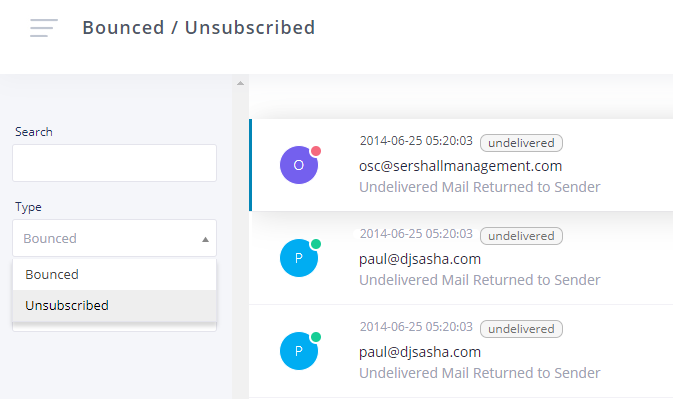
ampsuite groups bounce backs based on their type - permanent failure will result in the contact being removed immediately, Out of Office / Auto Reply bounce backs are recorded but do not remove the contact. All other bounce backs will be recorded and the contact may be removed if several occur in a row within a certain period.
Contacts who have been removed will have a red dot in the top right hand corner of the initials circle in the list, while contacts who have not been removed will appear with a green dot.
Some people use anti spam software on their mail which requires a sender to follow a link and verify that they are not automated spam by entering a code. You can verify these addresses by clicking on the row and following the relevant link found within the email text.
IMPORTANT: It is your responsibility to maintain a clean contact database. Do not send unsolicited mail to users who have not requested it or re add contacts who have previously requested to be removed. Failure to do so may result in your promotion module being disabled.
Unsubscribed
In accordance with anti-spam laws ampsuite offers all contacts the option to 'unsubscribe' from further emails. You can view a list of these contacts by selecting 'Unsubscribed' from the 'Type' dropdown in the left column filters.
Contacts are asked to leave an optional reason as to why they wish to unsubscribe - it is worth checking these as some times contacts will request to be readded on a different email address.
IMPORTANT: Do NOT re add users who have previously unsubscribed unless they have given you written permission to re add them. Failure to do so may result in your promotions module being disabled.